
One of the most belabored topics on the internet is the negative consequences of social media, particularly short form video (SFV) such as TikTok, Instagram Reels, and Youtube Shorts. Despite harming attention spans, invoking negative emotions, and reducing life satisfaction, people (including myself) still find these apps entertaining. Recent studies show that the negative effect depends mostly on the type of content you watch. However, in the corporate owned apps, you have little control over the videos they feed you. That is why I sought to create my own short form video client. This resulted in a full stack project that was very satisfying to work on, so I thought to document the process here in case anyone else wanted to give it a try.
This project consists of three blog posts; this is Part I, where we develop the backend in Python using FastAPI, SQLite3, and SQLAlchemy. We also make a couple small scripts to scrape and preprocess data into HLS format. In Part II, we make the frontend, an iOS app written in Swift that plays the videos in an infinite wheel of iOS AVPlayers, and can favorite and rate posts. Part III contains a couple smaller extensions to the app such as tags, progress bars, and a bit of discussion on the utility of short form video.
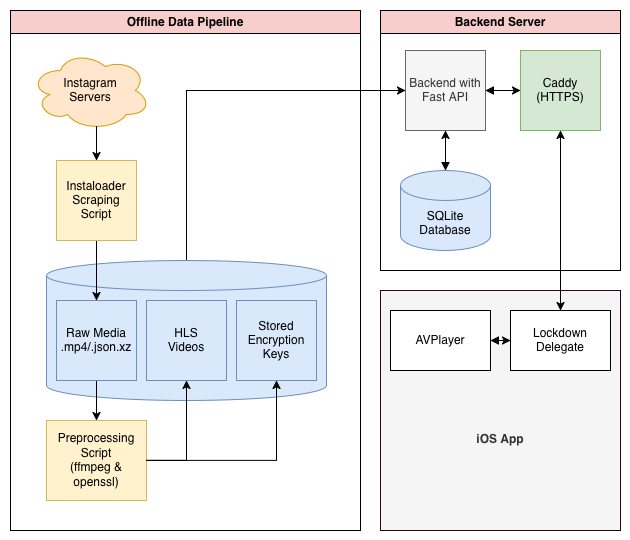
Collecting and Preprocessing Media
The first step is collecting the media that will eventually be served over the app. As a long time user of instagram reels, I’ve added thousands of videos into my profiles ‘saved’ collection. Mostly consisting of art that resonated with me, creative ideas I would one day attempt myself, or memes I found particularly funny. It makes sense that these would be the content I would want to see in my own app.
A quick kagi search led me to instaloader, an open source project designed for scraping posts and reels from instagram. Another quick search lead me to realize that (unsurprisingly) many accounts which use instaloader get flagged as bots and deactivated, which was not a risk I wanted to take. Instead I created a burner account on instagram to make the API calls, and exported all my main profile’s information to get ahold of a saved_posts.json file, which contains the shortcodes of all the posts I’ve ever saved that can be fed to instaloader.
Since I would manually be loading shortcodes and feeding them to instaloader, I couldn’t use the regular instaloader API, and instead needed to write a small notebook file to do the scraping.
import json
import re
import time
import random
import os
import instaloader
from instaloader import Post

USERNAME = "..."        # My burner account's name
JSON_FILE = "..."       # Path to saved_posts.json
DOWNLOAD_DIR = "..."    # Where I saved the reels

# %%

with open(JSON_FILE, 'r', encoding='utf-8') as f:
    data = json.load(f)

# Extract the shortcodes using regex
content = json.dumps(data)
pattern = r'instagram\.com/(?:p|reel|tv)/([^/"]+)'
all_shortcodes = set(re.findall(pattern, content))

print(f"Extracted {len(all_shortcodes)} shortcodes from {JSON_FILE}.")

# %%

L = instaloader.Instaloader(dirname_pattern=DOWNLOAD_DIR)

# You must run instaloader from the command line at least once
# to save the session file.
try:
    L.load_session_from_file(USERNAME)
except Exception as e:
    print(f"Session error: {e}")
    raise

for index, shortcode in enumerate(all_shortcodes, 1):
    print(f"[{index}/{len(all_shortcodes)}] Processing {shortcode}...")
    try:
        post = Post.from_shortcode(L.context, shortcode)
        expected_prefix = post.date_utc.strftime('%Y-%m-%d_%H-%M-%S')
        L.download_post(post, target=DOWNLOAD_DIR)

    except Exception as e:
        print(f" -> Exception processing {shortcode}: {e}")

	# Random delay to get around instagrams safeguards.
	delay = random.uniform(4, 16)
	print(f" -> Waiting {delay:.2f}s...\n")
	time.sleep(delay)
The result is a directory cluttered with various file types. Although the only parts relevant to us right now are the .mp4 and .json.xz files, the reels and metadata respectively.
Before we can write the backend, we need to convert the video files into HLS segments. Most modern video servers never try to serve an entire mp4 to the user, as that would create an awkward buffering period before every video is played, basically nullifying the traditional short form video experience. Instead, the HTTP Live Streaming or HLS format breaks a file down into many smaller chunks called .ts files and a .m3u8 playlist file. In our case, each chunk will be two seconds long, loading almost instantly on a modern internet connection, and allowing the video client to start playing the video as soon as the first .ts segment is received while it continues to fetch the consecutive segments in the background.
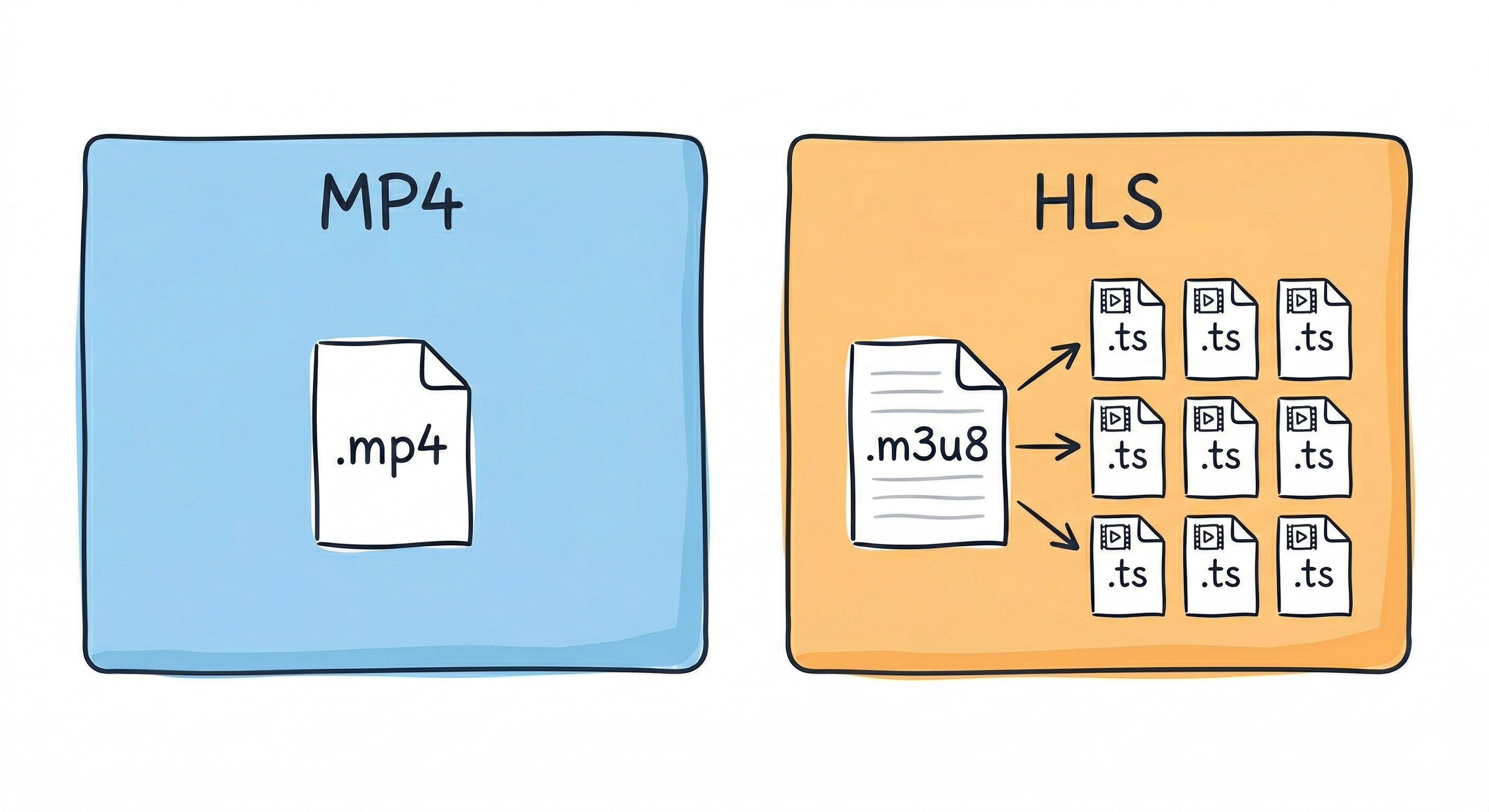
We can easily convert our scraped .mp4 files to the HLS format using ffmpeg. ffmpeg also allows us to encrypt each video file with an encryption key. We can generate a random key for each video using openssl and save it to a special key directory. It’s important to not save the keys to the same processed folder as the HLS videos since the latter will eventually be mounted as a public directory. After generating the key we call the following ffmpeg command in our bash script to process the files:
ffmpeg -y -i "$f" -c:v libx264 -c:a aac -r 30 -g 60 -keyint_min 60 -sc_threshold 0 -hls_time 2 -hls_list_size 0 -hls_key_info_file "$KEY_FOLDER/key_info" -hls_segment_filename "$OUTPUT_FOLDER/chunk_%03d.ts" "$OUTPUT_FOLDER/index.m3u8"
To break this up part by part:
-
-yis a generic flag to disable confirmation requests when the script is being run. -
-i <file>specifies the input file, in our case the raw .mp4. -
-c:v libx264tells ffmpeg to save with videos with the H.264 video codec, the most widely used video compression standard. Without it, certain videos would be too large, even in chunks, to send to the client. -
-c:a aacsets the audio compression to use AAC (Advanced Audio Coding).
Keyframing
-
-r 30forces the output to be 30 frames per second. This does incur a quality loss for some videos, but all instagram reels seem to be normalized to 30fps anyways. -
-g 60forces ffmpeg to insert a keyframe every 60 frames (2 seconds). This is vital since the HLS format can only split chunks on a keyframe. -
-sc_threshold 0disables scene detection. Normally, ffmpeg tries to insert keyframes when the scene changes. Since most SFVs are only one frame, we instead want keyframes to just appear every 2 seconds.
HLS & Encryption
-
-hls_time 2tells ffmpeg that we want each .ts segment file to be two seconds long. -
-hls_list_size 0ensures that the .m3u8 playlist includes all segments. Seems obvious however HLS is often used for livestreaming, in which case you only want the most recent n chunks being saved. -
-hls_key_info_file <key_info>path to the encryption manifest, including the key and URI (I’ll get to this later). -
-hls_segment_filename "$OUTPUT_FOLDER/chunk_%03d.ts"is the naming template for each chunk.%03dis the standard C string formatter for a 3-digit zero-padded number. If you for some reason are including files greater than 33 minutes long, you need to increase the number size, or preferably use larger chunks. - Lastly the final argument is where to save the file.
Below is the bash script built around this command, iterating over all the videos, generating and saving each an encryption key, then running the processing command.
#!/bin/bash

RAW_DIR=".../Reels/Raw"
PROCESSED_DIR=".../Reels/Processed"
KEYS_DIR=".../Reels/Keys"
BASE_KEY_URL="lockdown://localhost:8000/api/videos"

# Loops over every mp4 file in the raw directory and creates an HLS copy in the processed directory.
for f in "$RAW_DIR"/*.mp4; do
    [ -f "$f" ] || continue

    filename=$(basename -- "$f")
    foldername="${filename%.*}"
    OUTPUT_FOLDER="$PROCESSED_DIR/$foldername"

    if [ -d "$OUTPUT_FOLDER" ]; then
        echo "Skipping $foldername (already processed)"        continue
    fi

    echo "Processing vdeio: $foldername..."

    KEY_FOLDER="$KEYS_DIR/$foldername"
    mkdir -p "$KEY_FOLDER"
    openssl rand 16 > "$KEY_FOLDER/video.key"
    IV=$(openssl rand -hex 16)
    echo "$BASE_KEY_URL/$foldername/key" > "$KEY_FOLDER/key_info"
    echo "$KEY_FOLDER/video.key" >> "$KEY_FOLDER/key_info"
    echo "$IV" >> "$KEY_FOLDER/key_info"

    if ffmpeg -y -i "$f" -c:v libx264 -c:a aac -r 30 -g 60 -keyint_min 60 -sc_threshold 0 \
        -hls_time 2 -hls_list_size 0 \
        -hls_key_info_file "$KEY_FOLDER/key_info" \
        -hls_segment_filename "$OUTPUT_FOLDER/chunk_%03d.ts" \
        "$OUTPUT_FOLDER/index.m3u8" ; then

        echo "Finished $foldername"
    else
        echo "FFmpeg failed on $foldername."
    fi
    rm -f "$KEY_FOLDER/key_info"
done
Before running both the scraping and preprocessing scripts I made a couple more changes including skipping shortcodes already downloaded or processed and recovering safely from script crashes. I can’t go in depth into all the small changes I’ve included but they can be seen in the code on github. You can run the bash script simply by doing ./preprocess.sh or wherever you saved it. If it doesn’t work the first time, that’s likely because it needs execution permissions which can be done with chmod +x ./preprocess.sh
The Backend
Next up is constructing the backend that will ingest the HLS videos along with the metadata, handle the API requests for delivering content, and maintain the database. Since this is more of a personal toy project, I avoided using something heavy like Django which I’ve used in the past. I wrote a very simple API handler using FastAPI, a basic SQLite database, and sqlalchemy to connect the two.
First, our backend needs to initialize the sqlite database and mount the directories which stores all the processed HLS files.
from fastapi import FastAPI, APIRouter
from fastapi.staticfiles import StaticFiles
from sqlalchemy import create_engine
from sqlalchemy.orm import declarative_base, sessionmaker

SQLALCHEMY_DATABASE_URL = "sqlite:///./reels.db"
engine = create_engine(SQLALCHEMY_DATABASE_URL, connect_args={"check_same_thread": False})
SessionLocal = sessionmaker(autocommit=False, autoflush=False, bind=engine)
Base = declarative_base()

Base.metadata.create_all(bind=engine)

# Small generator function to pass around the db safely
def get_db():
	db = SessionLocal()
	try:
		yield db
	finally:
		db.close()

router = APIRouter()
app = FastAPI()

app.mount("/videos", StaticFiles(directory=".../Reels/Processed"), name="videos")

app.include_router(router)
Then, we can begin to write the API endpoints that the client will use to request videos and send feedback back to the server such as likes, ratings, and views.
Typical backends consist of three things: schemas, routes, and models. The model itself details what information will be stored for each object we will have in our database (for now, just videos, but eventually hashtags will be an object as well). Schemas are similar to models, however they are specifically objects that will be passed between the server and client, which doesn’t always include every attribute that the model contains in the database.
Let’s start by defining our ‘video’ model. Each column such as description or uploader is an attribute we want to store for every video, and eventually will automatically pull from the metadata .json.xz files.
from sqlalchemy import Column, Integer, String, Boolean, Table

class Video(Base):
    __tablename__ = "videos"
    id = Column(Integer, primary_key=True, index=True)
    folder_name = Column(String, unique=True, index=True)
    is_favorited = Column(Boolean, default=False)
    rating = Column(Integer, default=0)
    encryption_key = Column(String, nullable=True)

	# Metadata extracted from the .json.xz files
    description = Column(String, nullable=True)
    shortcode = Column(String, nullable=True)
    date_posted = Column(String, nullable=True)
    uploader = Column(String, nullable=True)
    username = Column(String, nullable=True)
    date_added = Column(String, nullable=True)
The schemas are similarly straight forward for now, however we must add additional objects for two future features: rating and favoriting a post which need to pass to the server if the post was just favorited or unfavorited, and which rating was just sent for the post.
from typing import List, Optional
from pydantic import BaseModel

class FavoriteUpdate(BaseModel):
    is_favorited: bool

class RatingUpdate(BaseModel):
    rating: int

class VideoOut(BaseModel):
    id: int

    folder_name: str
    is_favorited: bool
    rating: int
    description: Optional[str] = None
    shortcode: Optional[str] = None
    date_posted: Optional[str] = None
    uploader: Optional[str] = None
    username: Optional[str] = None
    date_added: Optional[str] = None

    model_config = {"from_attributes": True}
Lastly, we can move onto the routes, these are the endpoints which the client will use to directly communicate with the server, requesting information or videos and providing updates. However, before we get into that, we need to add a bit of security. Otherwise, anyone with the URL will be able to access the endpoints. This means that anyone could request the video data from the database which includes the encryption keys. Fortunately this is a fairly light hearted project, so in the worst case they would just be decrypting videos that are already publically available on instagram, or messing with how you rated the videos. Still, this is a learning project, and knowing how to include API keys is vital for any production work.
First off, I generated a secure API key again using SSL in my terminal and saving that key to a .env file in my project directory. Then I wrote a very simple boilerplate function that the routes will use to compare the API key attached to every request to the one saved in the .env file. In the case that the API key is incorrect, it raises a HTTP 401 error, the standard for incorrect credentials. One small note is that the comparison uses the secrets.compare_digest() function instead of a simple != comparison. This is a standard precaution to fend off timing attacks, where it’s possible to decrypt an API key by measuring the time it takes for the server to reject a request.
import os
import secrets
from dotenv import load_dotenv
from fastapi import Security, HTTPException, status
from fastapi.security import APIKeyHeader

load_dotenv()
API_SECRET_KEY = os.getenv("API_KEY")
api_key_header = APIKeyHeader(name="api-key", auto_error=True)

def verify_api_key(api_key: str = Security(api_key_header)):
    if not secrets.compare_digest(api_key, API_SECRET_KEY):
        raise HTTPException(
            status_code=status.HTTP_401_UNAUTHORIZED,
            detail="Invalid or missing API Key"
        )
Now we can start implementing the routes. Perhaps the most important route to start with is a command that will tell the server to go through all the processed video files and add them to the database, since it is still currently empty. Note the decorator at the top of the function @router.post("/api/sync", dependencies=[Depends(verify_api_key)]), this defines how the endpoint is accessed and that it must satisy the API key condition we just wrote. Additionally, it denotes this endpoint as a POST request, meaning that it is telling the server to do something with new information, opposed to a GET request which is a request for the server to return some information.
The sync function does a bit more than just create the entries. It also parses the key file stored in the Keys directory, and parses the .json.xz files that our instaloader script returned for any metadata which might be useful to display in the front end. The json is pretty rich, including all comments, tags, profile pictures, etc. Tons of additional information which you may want to include.
import os
import lzma
import json
import re
from fastapi import APIRouter, Depends, HTTPException, Response
from datetime import datetime
from sqlalchemy.orm import Session

@router.post("/api/sync", dependencies=[Depends(verify_api_key)])
def sync_videos(db: Session = Depends(get_db)):

    video_root = ".../Reels/Processed"
    keys_root = ".../Reels/Keys"

    added = 0

    for item in os.listdir(video_root):

        full_path = os.path.join(video_root, item)
        is_dir = os.path.isdir(full_path)
        has_index = os.path.exists(os.path.join(full_path, "index.m3u8"))

        if is_dir and has_index:
            existing_video = db.query(Video).filter(Video.folder_name == item).first()

            key_path = os.path.join(keys_root, item, "video.key")
            key_hex = None
            if os.path.exists(key_path):
                with open(key_path, "rb") as f:
                    key_hex = f.read(16).hex()

            raw_metadata_path = f".../Reels/Raw/{item}.json.xz"
            meta_desc = meta_shortcode = meta_date = meta_uploader = meta_username = None

			# Parse the metadata json
            if os.path.exists(raw_metadata_path):
                try:
                    with lzma.open(raw_metadata_path, "rt", encoding="utf-8") as f:
                        data = json.load(f).get("node", {})

                        caption_edges = data.get("edge_media_to_caption", {}).get("edges", [])
                        if caption_edges:
                            meta_desc = caption_edges[0].get("node", {}).get("text")

                        meta_shortcode = data.get("shortcode")

                        timestamp = data.get("taken_at_timestamp")
                        if timestamp:
                            meta_date = datetime.fromtimestamp(timestamp).strftime('%Y-%m-%d')

                        owner = data.get("owner", {})
                        meta_uploader = owner.get("full_name")
                        meta_username = owner.get("username")

                except Exception as e:
                    print(f"Failed to parse metadata for {item}: {e}")

            if not existing_video:
                new_video = Video(
                    folder_name=item,
                    encryption_key=key_hex,
                    description=meta_desc,
                    shortcode=meta_shortcode,
                    date_posted=meta_date,
                    uploader=meta_uploader,
                    username=meta_username,
                    date_added=datetime.now().strftime('%Y-%m-%d'),
                )
                db.add(new_video)
                added += 1

    db.commit()
    return {"message": f"Synced {added} new videos.", "total_in_db": db.query(Video).count()}
There are a couple more vital endpoints we need to add before we can move on to the front end. First, we need the two most important GET requests:
-
get_random_feed, to get a set number of random videos from the database to add to the users feed. -
get_video_key, the endpoint to get a decryption key for a specific video
from sqlalchemy.sql.expression import func

@router.get("/api/feed/random", response_model=List[VideoOut], dependencies=[Depends(verify_api_key)])
def get_random_feed(db: Session = Depends(get_db)):
    """Returns 10 random videos from the database."""
    return db.query(Video).order_by(func.random()).limit(10).all()

@router.get("/api/videos/{folder_name}/key", dependencies=[Depends(verify_api_key)])
def get_video_key(folder_name: str, db: Session = Depends(get_db)):
    video = db.query(Video).filter(Video.folder_name == folder_name).first()
    if not video or not video.encryption_key:
        raise HTTPException(status_code=404, detail="Key not found")

    return Response(content=bytes.fromhex(video.encryption_key), media_type="application/octet-stream")
Again, notice that both of the above requests require the API key for anything to happen, otherwise we are just handing the videos and decryption keys to anyone who asks. Next we can implement the next two POST requests: update_favorite and update_rating. These will make use of our FavoriteUpdate and RatingUpdate schemas respectively. I chose to have my ratings limited to be between 0 and 10 so that the UI can represent them as stars.
@router.post("/api/videos/{folder_name}/favorite", dependencies=[Depends(verify_api_key)])
def update_favorite(folder_name: str, payload: FavoriteUpdate, db: Session = Depends(get_db)):
    video = db.query(Video).filter(Video.folder_name == folder_name).first()
    if not video:
        raise HTTPException(status_code=404, detail="Video not found")

    video.is_favorited = payload.is_favorited
    db.commit()
    return {"message": "Favorite updated", "folder_name": folder_name, "is_favorited": video.is_favorited}

@router.post("/api/videos/{folder_name}/rating", dependencies=[Depends(verify_api_key)])
def update_rating(folder_name: str, payload: RatingUpdate, db: Session = Depends(get_db)):
    if payload.rating < 0 or payload.rating > 10:
        raise HTTPException(status_code=400, detail="Rating must be between 0 and 10")

    video = db.query(Video).filter(Video.folder_name == folder_name).first()
    if not video:
        raise HTTPException(status_code=404, detail="Video not found")

    video.rating = payload.rating
    db.commit()
    return {"message": "Rating updated", "folder_name": folder_name, "rating": video.rating}
That finishes the bare minimum for the backend! Next steps are to get the server running, then to work on the front end, which, in this case is an iOS SwiftUI app.
Making It Run
There isn’t a one-size-fits-all approach to hosting your server. In some cases you might only want it available locally, in others you want something that would scale like an AWS server. In my case, I own a small media server which I mostly use as a homelab for movies. Since I’m the only person ever going to use this client, its a no-brainer for me to run it there.
Regardless of where you deploy your backend, I recommend running the server with Uvicorn and using Caddy as a reverse proxy to handle the HTTPS certification.
To run the server from the project directory with uvicorn, you can use the following:
uvicorn <filename>:app --host 0.0.0.0 --port XXXX --reload. Then, to populate the database, from the same machine run curl -X POST http://127.0.0.1:XXXX/api/sync -H "api-key: <your api key>" to call the sync command and have the server ingest all the data. This will take a couple seconds to run depending on how many processed videos you have, but when it’s complete you should see something like this: {"message":"Synced 424 new videos.","total_in_db":424}. If you get to this point, you know your backend is live and the data has been added to the database!
Part I: Finale
This wraps up Part I. At this point we have successfully created an offline data pipeline to scrape and preprocess SFVs, and a backend that will allow us to serve those videos along with metadata to the frontend. Part II is solely focused on creating this frontend, an iOS app made with iOS’s AVPlayer and SwiftUI, and concludes with a fully functional product. The third part is just some smaller extensions, such as adding tags, filtering posts, and adding a progress bar to the player. If you actually read this far, I hope you will continue to read on, so that you too will have a fully fledged short form video app.